
What is Trello – and what does it do?

Trello is a visual task management tool that helps teams organize, track, and complete work using boards, lists, and cards. Task management itself means breaking projects into smaller pieces of work, assigning them to people, and following them through to completion.
Trello uses a Kanban-style approach, which is a visual workflow method where work moves across columns to show progress from start to finish. Three core components make this possible:
Boards: the top-level workspace where a project lives, like a digital bulletin board for one team or initiative.
Lists: columns inside a board that represent stages of work, such as "to do," "in progress," and "done."
Cards: individual tasks that sit inside lists. You drag a card from one list to the next as work moves forward.
A task manager built around Trello relies on the drag-and-drop motion to show status at a glance. Once you understand how the three pieces fit together, it becomes easier to judge whether Trello matches the way your team actually works.
Trello limitations and common pain points
Trello works smoothly for simple workflows, but teams running into scale or complexity tend to bump up against the same issues. These often surface when figuring out how to manage a team across more than a few projects.
Scalability challenges: boards can get cluttered with large teams, and information often gets siloed across multiple boards with no easy way to view everything together.
Feature fragmentation: adding several Power-Ups to fill gaps creates a patchwork setup that can be hard to maintain.
Team management limitations: native collaboration features stay basic, and there is no built-in time tracking or Trello resource management functionality.
These limits matter most when your team grows beyond a handful of people.
With Trello, we did not feel that the provider shared our concerns. […] The fact that our data was being stored on servers in the USA made us uncomfortable.
 AF
AFAxel Fischer
Managing Partner, Akku Fischer
Signs you may need a Trello alternative
Three concrete signals tend to point teams toward a Trello alternative.
1. Certifications and audit requirements
Security is one of the first questions teams ask when evaluating Trello for task management, especially in regulated industries. Trello's baseline security is solid – Atlassian has tightened it over the years, including requiring user authorization to view uploaded attachments since late 2023.
The gap shows up at audit time. If your organization requires data to stay within EU borders, – ISO 27001, documented GDPR compliance, formal access controls – "solid baseline" isn't something you can hand to an auditor. Public sector, finance, and manufacturing teams often need certifications behind the tool, not just security within it.
2. Demand for advanced collaboration
Teams that want integrated documentation alongside tasks – not just file attachments – often outgrow Trello. When meeting notes, project briefs, and task lists live in separate tools, context gets lost between them.
Real-time collaboration on task details and a built-in knowledge base become important for keeping teams aligned. Some platforms combine task management with collaborative documentation in a single workspace, eliminating the back-and-forth between apps.
3. Data residency
This one is less about your security team and more about your market. Trello is owned by Atlassian, a US-based company, and stores data on US infrastructure – which is invisible until a European client, partner, or procurement team asks where their data lives. Expanding into EU markets increasingly means answering that question in writing, and "on Amazon S3 in the US" can end a deal before the demo. If EU-hosted data is becoming a condition of doing business rather than a nice-to-have, that's the clearest signal of the three.
Choosing the right replacement for your team: overview
Choosing the right Trello alternative depends on what your team needs most: simplicity, advanced planning, customization or security. Here is a practical way to think about it:
Your situation
Best fit
Why
You want Trello's simplicity plus EU hosting and compliance
MeisterTask
Familiar Kanban boards, built-in Notes, ISO 27001, all data hosted in Germany
Large org with dedicated PMs and cross-team planning
Asana
Portfolios, goals, multiple views — at the cost of setup effort
You want to build workflows around your exact processes
monday.com
Deep customization and dashboards, if you have the time to configure them
Security is the top requirement and you want one platform for everything
Stackfield
End-to-end encryption, BSI C5, chat + files + tasks in one suite
Large team that wants collaboration features close to the work
Hive
Built-in notes, calendar integration, client-facing chats
Agile, cross-departmental work with resource planning
Wrike
Sprint templates, workload and budget planning — steeper for non-technical teams
Engineering-led team committed to agile Engineering-led team committed to agile
Jira
Sprints, backlogs, bug tracking; EU data residency on Cloud
Small dev/QA team that just needs bug tracking
Backlog
Focused and budget-friendly, without the full PM suite
Technically confident team that wants maximum features in one app
ClickUp
Custom everything, strong dev integrations, real learning curve
Your processes are too unique for any template
Airtable
Build your own system — flexibility traded against simplicity
Enterprise programs with heavy resource and budget demands
Microsoft Project
Portfolio-grade planning; Windows only, months of onboarding
You want Kanban done well, nothing more
Businessmap (formerly Kanbanize)
Interlinked boards and global visibility without feature bloat
Small team on a tight budget that still wants portfolio views
Nifty
Dependencies, dashboards and reporting at a starter price
Structured review and approval workflows
ProofHub
Request forms, approval steps and built-in discussion — flat-rate pricing
1. MeisterTask
Capterra rating: 4.7/5
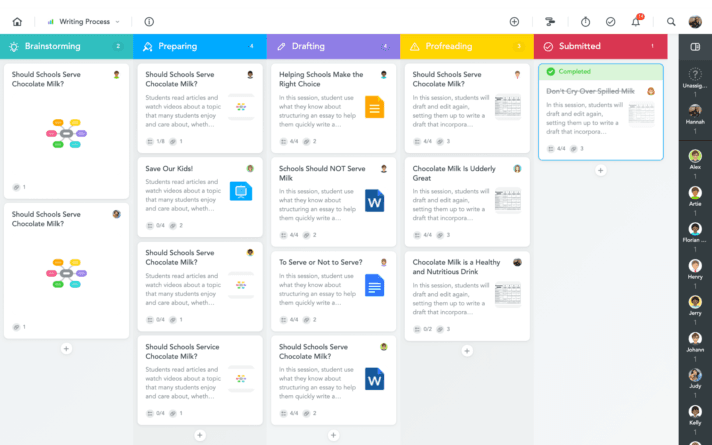 MeisterTask is a secure, EU-based task management platform built for teams that value simplicity alongside compliance. It is ISO 27001 certified, fully GDPR compliant, and hosted in Germany – which matters for organizations operating under EU data sovereignty rules.
The Kanban boards work much like Trello's, so the visual style feels familiar to anyone making the switch. The difference is what comes built in: collaborative Notes for documentation alongside tasks, AI assistance for task creation, customizable templates, and native integrations.
Feature
Trello
MeisterTask
Data hosting location
United States
Germany (EU)
Compliance certifications
SOC 2, GDPR
ISO 27001, full GDPR
Built-in documentation
via Power-Ups
Native (Notes)
AI assistance
Limited
Built-in
Native integrations
Power-Ups (many paid)
Included across plans
2. Asana
Capterra rating: 4.5/5
Asana is built for organizations that manage work at the portfolio level: multiple projects, cross-functional goals, and dedicated project managers keeping it all aligned. Every major view is covered – list, calendar, timeline, Gantt and Kanban – alongside subtasks, custom fields, dependencies and AI features, and its broad integration catalog makes it a natural hub when work flows in from many other systems.
The strength and the weakness are the same thing: structure takes work to build. Teams consistently report that setting up processes, onboarding users and keeping workflows consistent demands real time and ownership – and for anyone simply trying to assign tasks and keep a team aligned, Asana can feel bigger than the problem it's solving.
One more thing for European teams to check: Asana does offer EU data residency, but access is tied to Enterprise-level plans.
If you have complex planning needs and the resources to manage a heavyweight tool, Asana earns its reputation.
3. monday.com
Capterra rating: 4.6/5
Where most task managers give you a workflow, monday.com gives you a construction kit. Boards, dashboards, automations, documents, Gantt views and AI features can be assembled around almost any process, which is why teams across marketing, operations, HR and IT all manage to make it their own.
Just know what you're signing up for. A useful monday.com setup means making many decisions upfront – which boards to create, how workflows connect, what dashboards show, which automations run – and for less technical teams, the tool itself can become another project to manage.
On hosting, monday.com supports US, EU and APAC data regions, but the EU region is available only under specific account and plan conditions, with strict regional residency reserved for Enterprise accounts.
Choose monday.com if customization is your top priority and someone owns the system internally. If you'd rather start working today on a platform hosted in Germany by default, MeisterTask is the more straightforward choice.
4. Stackfield
Capterra rating: 4.8/5
Security is Stackfield's entire identity. The German platform combines task and project management with team chat, discussions, file sharing, pages and whiteboards – and encrypts relevant content end-to-end, directly in the browser, using AES and RSA algorithms. Its certification list is genuinely impressive: a BSI C5 attestation plus ISO 27001, 27017 and 27018.
The real question is scope. Stackfield is an all-in-one suite, which is a strength if you want to replace several tools at once – and redundant weight if your team already lives in Microsoft Teams, Slack or Google Workspace. It also offers no free plan, so there's no lightweight way to trial it with a small team before committing.
For organizations that want encrypted communication, files and tasks under one roof, Stackfield is a serious contender. If you need the German hosting and compliance but not the full suite, MeisterTask covers the task management core with built-in documentation and far easier adoption.
5. Hive
Capterra rating: 4.4/5
Hive's pitch to larger teams is collaboration that lives inside the work rather than around it. You can take meeting notes directly in the tool and convert follow-ups into tasks, share meeting links through calendar integration, and set up private group chats that keep clients in the loop on progress – all on top of the expected Gantt, table and calendar views, dashboards, goals and reporting.
Getting there is an investment. Reviewers describe a steep learning curve and recommend planning a proper rollout rather than expecting instant adoption; there have also been reports of automations misbehaving and a mobile app noticeably less capable than the desktop version – worth weighing if your team works on the go.
Hive suits larger teams that want rich collaboration woven into their project views and are prepared to onboard properly.
6. Wrike
Capterra rating: 4.4/5
Wrike is at its best in the hands of a manager. Resource planning is the standout: budgets, demand forecasting and team workloads are all handled in one place, and work can be reviewed inside the tool, which keeps feedback moving across departments. Customizable workspaces and ready-made templates for sprint planning, product roadmaps and support tickets make it a strong fit for agile, cross-functional organizations.
The catch is that not everyone experiences the same Wrike. Engineers tend to find their way quickly; users in commercial departments have described it as hard to learn and unintuitive. And because it aims to do everything, teams can feel bombarded with features they never touch – sometimes less is more.
If resource planning across departments is your core need and your teams skew technical, Wrike delivers.
7. Jira
Capterra rating: 4.5/5
For software teams, Jira barely needs an introduction – it's the default home for agile engineering work, with sprint planning, bug tracking, backlogs, roadmaps and automations that break huge projects into trackable pieces.
Two things have changed since Jira's reputation was formed, and both matter here. First, hosting: Atlassian has ended support for its Server products and announced the phase-out of Data Center, so self-hosting is a closing door rather than a long-term strategy. The upside is that Jira Cloud now offers data residency, letting organizations pin their data to a chosen region, including the EU. Second, the audience question hasn't changed at all: supporting non-technical departments in Jira still creates extra work for technical teams, and even technical managers have reported struggling with the interface.
Jira remains the right call for engineering-led organizations committed to agile. If your team spans technical and non-technical roles and needs a tool everyone can actually use – with EU hosting as the default rather than a configuration – MeisterTask is the more accessible choice.
8. Backlog
Backlog by Nulab is deliberately small. It's a task manager built for developer and QA teams – bug reporting and tracking, boards, Gantt and burndown charts, task hierarchies, custom fields – and it doesn't try to be anything more. For a small dev team, that restraint is the appeal: you get the workflows you need at a budget-friendly price, without the overhead of a full project management suite.
The limits are real, though. The narrow feature set doesn't stretch to large, cross-functional projects, and users have flagged friction in daily use: statuses that need manual reassignment, notification issues, confusing filters and a mobile app described as unwieldy next to the desktop version.
For small development teams that want bug tracking without ceremony, Backlog does one job and does it affordably.
9. ClickUp
Capterra rating: 4.6/5
"One app to replace them all" is ClickUp's slogan, and the feature list backs up the ambition: customizable projects and workflows, custom task relationships and filters, GitHub, GitLab and Bitbucket integrations, sprint automations and bug tracking. DevOps and product teams in particular will find almost nothing missing.
Abundance has a price. Users report a steep learning curve, an overload of distracting – and sometimes unreliable – notifications, and a mobile app missing desktop features. On data hosting, the picture has improved but comes with fine print: EU hosting in Ireland is available, but only on the Enterprise plan, and some data – including login authentication and anything processed by AI features – is handled outside the selected region.
ClickUp rewards technically confident teams that genuinely want maximum functionality in one tool. If you value clarity over feature count – and German hosting on every plan over EU hosting on the top one – MeisterTask keeps things refreshingly simple.
10. Airtable
Capterra rating: 4.6/5
Airtable is a database that can become a task board. Teams build custom workflows, connect their data and set up advanced automations, essentially shaping the tool into whatever their processes require. Reporting is just as open-ended: you can pull exactly the information you need, or code your own reporting systems, which is genuinely valuable when your processes are unique to your industry or change often.
That freedom is the trade. Users describe the customization options as overwhelming and the formulas as overly complicated, and many report spending significant time learning the tool before it pays off. It's also a weak home for documentation: long-form content is possible but not intuitive.
Airtable fits teams with genuinely bespoke processes and the technical confidence to build their own system – less so teams that just want to manage tasks out of the box.
11. Microsoft Project
Capterra rating: 4.3/5
Microsoft Project is enterprise-grade planning – connected roadmaps, portfolio dashboards, and resource management deep enough to define project teams and request materials, equipment and budget – but it's a product line in transition. Microsoft is consolidating its cloud project tools into Planner: Project for the web was folded in during 2025, and Project Online retires in September 2026, with premium Planner plans now carrying the portfolio, dependency and Gantt features. The classic Project desktop client remains available for organizations that need traditional scheduling – and remains Windows-only, so Mac-based teams are out of luck.
The other constant is the learning curve. The interface takes months to feel comfortable, onboarding is complicated and time-consuming, and for large teams the licensing adds up quickly.
For Windows-based enterprises running complex, resource-intensive programs inside the Microsoft ecosystem, the Project-and-Planner stack is a natural fit. If you want project visibility without months of onboarding – on any operating system – MeisterTask is the way to go.
12. Businessmap
Capterra rating: 4.8/5
Businessmap (formerly Kanbanize) is for teams that want Kanban done properly, and nothing more. The interface is user-friendly and less feature-heavy than most alternatives here, yet still adaptable: custom workflows, multiple connections between tasks and teams, and a global view with customizable dashboards that keeps everything in sight. As a middle ground between Trello's simplicity and a full work management suite, it's an appealing place to land.
Full functionality often depends on third-party integrations that can cost extra, users have asked for more customization than the tool offers, and hosting deserves a closer look: the default setup can place data on US servers, with EU hosting in Ireland available on request – so residency-sensitive teams need to confirm their configuration rather than assume EU hosting out of the box.
For focused, connected Kanban boards with strong visibility, Businessmap is a solid pick – just ask the hosting question early.
13. Nifty
Capterra rating: 4.6/5
Nifty punches above its price point. Small teams get portfolio organization with insights on a single dashboard, tasks with subtasks and dependencies, and basic reporting on projects and workloads – a combination that usually sits in a higher tier elsewhere. For teams watching their spend, that's decent value.
What you give up is depth and polish. Users have asked for a better chat function, stronger document creation and more storage options, and daily use has rough patches: reviewers mention slow load times and an interface that can overwhelm less technical team members.
Nifty makes sense for budget-conscious teams that want portfolio views without a premium price tag – as long as fast, frictionless daily use isn't the top requirement.
14. ProofHub
Capterra rating: 4.5/5
ProofHub is built around a specific workflow: work that needs to be reviewed and approved. Request forms, approval steps and real-time reporting structure the review process, while in-app file feedback, project notes, discussions and private chat keep the surrounding conversation in one place – including with external collaborators. Its flat-rate pricing model is also unusual in this list, which can suit growing teams that don't want per-seat costs.
The experience is noisier than the concept. Dense views make it hard to focus, users have called for better Kanban board navigation, the learning curve is steep, and erratic, overwhelming notifications are a common enough complaint that managing them becomes its own task.
For teams with structured review processes who want approvals and communication woven into task management, ProofHub covers ground Trello never will.
Making the switch without losing data
Migration is often the biggest worry when teams consider leaving Trello. The good news is that most of the work follows a predictable process, and your task management data does not have to get left behind.
1. Exporting task data
Trello allows you to export board data in JSON format, and most alternatives offer import tools or CSV compatibility. Task names, descriptions, due dates, and basic structure usually transfer cleanly.
What does not transfer automatically: custom Power-Up data, Butler automations, and features unique to Trello's setup. MeisterTask offers a straightforward import process for Trello boards, which handles core task management data without manual rebuilding.
2. Managing user permissions
Before moving everyone over, set up team roles and permissions in the new tool. Invite key stakeholders first – team leads, project managers, admins – so they can configure boards and workflows in advance.
Then transition the rest of the team gradually. Bringing people in waves rather than all at once reduces disruption and gives early adopters time to support their colleagues.
3. Onboarding your team
Running both systems in parallel for a short window can ease the transition. It gives people a fallback while they learn the new tool and helps you catch data or workflow gaps early.
Provide training sessions or short documentation, and start with one project before a full rollout. Gather feedback as you go and adjust workflows. Knowing how to manage a team through change is just as important as the tool itself.
Ready to move beyond Trello?
Trello works well for small teams running simple workflows, but regulated industries and growing departments often want more from their task management setup. The right tool matches your team's security requirements, collaboration needs, and where you are headed next.
Take a closer look at MeisterTask — Kanban your team already knows how to use, with EU hosting and ISO 27001 as standard rather than as an upgrade.
Frequently asked questions about Trello alternatives for task and project management
Trello-specific automations like Butler rules do not transfer automatically, but most alternatives including MeisterTask offer similar automation features you can recreate using their native tools. Plan for a short setup window to rebuild the automations your team relies on most.
Several tools on this list offer free tiers, including MeisterTask, Asana, ClickUp and Nifty, and most others offer trials. Free plans differ sharply in user limits and features, though – and full compliance features such as EU data hosting and ISO 27001-backed security typically sit on paid plans. If a free tier is the requirement, test whether it covers your team size before committing.
Yes – MeisterTask provides the core capabilities found in Trello project management tools, including Kanban boards, task assignments, due dates, and attachments. It also adds integrated Notes for documentation, AI assistance, and stronger security features without relying on third-party add-ons.
Match the tool to your team's primary constraint. The comparison table above maps fourteen tools to common situations.